
Follow us on Social Media


CONSOLIDATED E-INVOICE
Effortless invoicing—buyers generate invoices for suppliers, ensuring accuracy and compliance.
What is Consolidated E-Invoice?
Consolidated e-invoicing offers a smarter way to manage high-frequency, low-value transactions.
Instead of issuing individual e-invoices, suppliers can provide regular receipts and submit a single consolidated e-invoice to IRBM on a monthly basis — reducing admin work while staying compliant.

Streamlines invoicing for small, frequent transactions

Reduces paperwork when dealing with walk-in customers or small businesses

Ensures compliance with IRBM’s e-invoicing mandate effortlessly
Who Can Apply and Who Cannot?
Qualified

-
The reigning rulers and leaders
-
Former rulers and leaders
-
The spouse of the reigning ruler
-
The spouse of the former ruler
-
Consulates and diplomats, consular officers, and consulate staff
-
Buyers who do not require an e-Invoice
Unqualified
-
Automotive industry
-
Aviation industry
-
Luxury goods and jewelry
-
Construction industry
-
Wholesale and retail of building materials
-
Licensed betting and gaming industry
-
Payments to agents, dealers, or distributors

How to Submit a Consolidated E-Invoice?

1. The system will automatically retrieve customer information from the details preset in Maintain Customer. You can also modify the customer details directly here
2. Item Classification will automatically retrieve data from Maintain Item, and you can also modify it here
3. Submission Type must be set to Consolidate (You can also preset this in Maintain Customer)
4. For TIN Number, select EI00000000010 General Public
5. In Invoice Browser under MyInvois, click the dropdown arrow to display the list
6. Select Consolidate E-Invoice to proceed with submission
7. You can filter the date for the Consolidated E-Invoice you want to submit
8. For regular E-Invoices that have not yet been submitted to LHDN, you can also select them here and submit them as a Consolidated E-Invoice

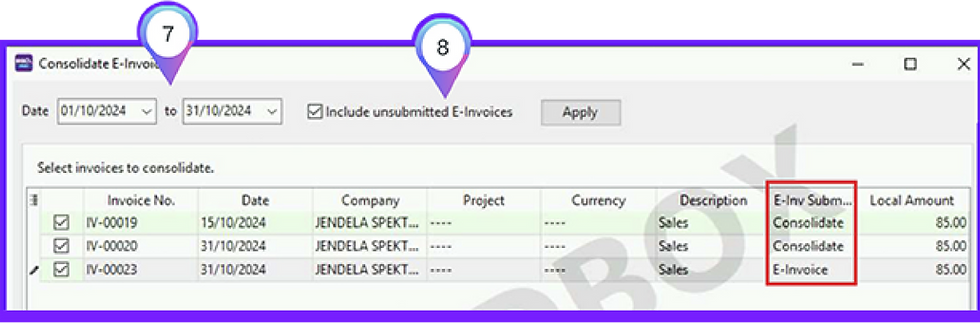

9. Click "Next" to proceed to the next step
10. The system will display the details of all invoices, preparing them for submission as a Consolidated E-Invoice
11. Click "Submit" to submit the Consolidated E-Invoice to LHDN


12. After submitting the Consolidated E-Invoice, you will see the Consolidate Running Number generated by LHDN
13. Once an invoice has been submitted as a Consolidated E-Invoice, the Invoice Browser will display its E-Invoice Submission as "Consolidate"

E-Invoice Articles


For more info, may contact
Our friendly product specialist will be very happy to help you all day, everyday.
📞 +6013 - 456 8000
